Jan 13, 2026

Self-Supervised Learning: How Machines Learn Without Human Labels

Self-Supervised Learning (SSL) is a revolutionary new method in machine learning. It teaches models powerful skills using only unlabeled data. Essentially, the model creates its own teacher signal, removing the need for costly human labels. SSL effectively bridges the gap between traditional learning methods that rely on extensive labelling and pure unsupervised methods.


Core Mechanism: The Pretext Task


The Pretext Task is the core idea behind SSL. It's a simple puzzle that the machine must solve using only the input data. This puzzle forces the model to discover deep, meaningful patterns within the data.


The entire learning process happens in two distinct stages:


1. Pre-training (Self-Supervised): The model first trains on a huge, unlabeled dataset to solve the initial pretext task. This crucial stage allows the model to build a highly flexible, general-purpose understanding of the information.


2. Fine-tuning (Supervised): Next, researchers take the powerful, pre-trained model and fine-tune it. They focus on the final downstream task (like finding objects in photos or classifying text) using a much smaller, labelled dataset.


The model generates its own training labels during the first stage; therefore, people often call them pseudo-labels.


SSL in Computer Vision (Vision)


SSL transforms computer vision. Now, models learn to recognise and understand what's in images and videos without needing a human to mark every pixel.


The main goal is to build strong visual representations that genuinely capture an image's meaning. Modern vision systems rely on a few clever techniques:


  • Contrastive Learning (e.g., SimCLR, MoCo): This is the leading method today. The system forces similar images closer together in its understanding. Conversely, it pushes features from different images far apart. This training teaches the model precisely what makes one image distinct from another.

  • Creative Pretext Puzzles:

Image Inpainting: The model sees a picture with a masked section, and it must fill in the missing pixels.

Jigsaw Puzzles: The model gets shuffled image pieces and must rearrange them back into the original order.

Rotation Prediction: The system rotates an image by a specific amount (90∘ or 180∘) and must correctly guess the rotation angle.


SSL in Natural Language Processing (NLP)


SSL powers the tremendous success of every major modern language model, including BERT and GPT. It helps models grasp complex language rules and context from enormous amounts of raw, unorganised text.


These models train using highly effective self-supervised tasks:


  • Masked Language Modelling (MLM): BERT popularised this approach. The model randomly hides about 15% of the words in a sentence. Then, it uses the words on both sides to predict what the original masked word was.

  • Next Sentence Prediction (NSP): This task also helped train BERT. The model reads two separate sentences and must decide if the second sentence immediately follows the first in the source document.

  • Auto-regressive Language Modelling (e.g., GPT): This method trains the model to predict the very next token in a sequence. It only uses the preceding text for context, allowing it to generate new, coherent sentences.

SSL in Robotics


SSL is critical for robotics because humans cannot realistically label the massive amount of sensor data a robot creates. Manually labelling every camera frame or depth reading for every action is just too costly.

Instead, SSL techniques enable robots to learn diverse skills and build a comprehensive map of their environment all by themselves:

  • Visual Feature Learning for Manipulation: Robots spend hours recording video data while moving objects. SSL uses this raw video to extract general visual features, like object boundaries or depth perception. It achieves this by trying to predict future frames or the relative motion between the cameras.

  • Time-Contrastive Networks (TCNs): These specialised networks learn from sequential data, such as video frames from a robot's eye. TCNs group frames close in time together while separating frames far apart. This process helps the robot truly understand the temporal dynamics of its own movements.

  • Unconstrained Terrain Navigation (e.g., STERLING): SSL allows robots to learn tough terrain features like roughness or slipperiness. They learn this from their own continuous, real-world trials, enabling them to confidently navigate off-road without needing human-made maps.

Dec 21, 2025

Redux Toolkit for React: Ditch Boilerplate and Build Your First Slice

Redux Toolkit is where Redux stops feeling “painful” and starts feeling fun. When Redux first clicked for me was the moment I deleted 50+ lines of boilerplate and replaced them with a tiny createSlice. In this part, you and I will move from “old-school Redux” to modern Redux Toolkit (RTK)—the version the official docs recommend for almost every new project now.


Why Redux Toolkit?


Classic Redux made you write:

  • Action type constants
  • Action creators
  • Big switch reducers
  • Manual immutability (return {...state, ...})
Redux Toolkit wraps all that into a few small helpers and encourages best practices by default:
  • configureStore → store setup + DevTools + middleware
  • createSlice → actions + reducer in one place
  • createAsyncThunk → async flows (we’ll use this in a later part)
If Redux ever felt “too much”, RTK is the cure.


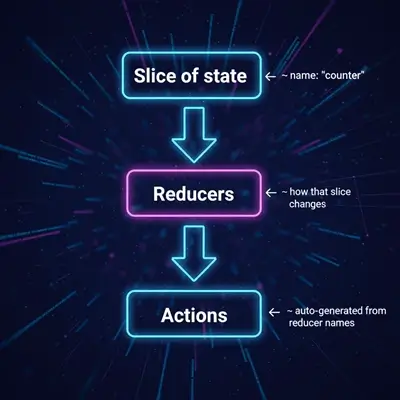
Imagine a simple Redux slice as:


redux-slice


You focus on “what state changes” and RTK does the wiring.


Step 1: Install Redux Toolkit and React-Redux


If you haven’t already:


npm install @reduxjs/toolkit react-redux

This gives you everything needed for modern Redux in React.


Step 2: Create a Store with configureStore


Create a file: src/store.js


// src/store.js
import { configureStore } from '@reduxjs/toolkit';
import counterReducer from './counterSlice';

export const store = configureStore({
  reducer: {
    counter: counterReducer
  }
});

// Optional: you can log the initial state
console.log('Initial state:', store.getState());


What this does:

  • Combines all slices under reducer
  • Enables Redux DevTools automatically
  • Wires up sensible middleware (incl. for async later)
You’ll add more slices (e.g., usertodos) to this store as the app grows.


Step 3: Create Your First Slice with createSlice


Create: src/counterSlice.js


// src/counterSlice.js
import { createSlice } from '@reduxjs/toolkit';

const initialState = {
  value: 0,
  step: 1
};

const counterSlice = createSlice({
  name: 'counter',        // slice name
  initialState,
  reducers: {
    increment(state) {
      // Immer lets us "mutate" safely
      state.value += state.step;
    },
    decrement(state) {
      state.value -= state.step;
    },
    reset(state) {
      state.value = 0;
    },
    setStep(state, action) {
      state.step = action.payload;
    }
  }
});

export const { increment, decrement, reset, setStep } = counterSlice.actions;
export default counterSlice.reducer;


Key things to notice:

  • No manual switch statement.
  • No return { ...state }—you can write “mutating” code, and RTK handles immutability under the hood.
  • Action creators are generated for you (increment()decrement(), etc.).
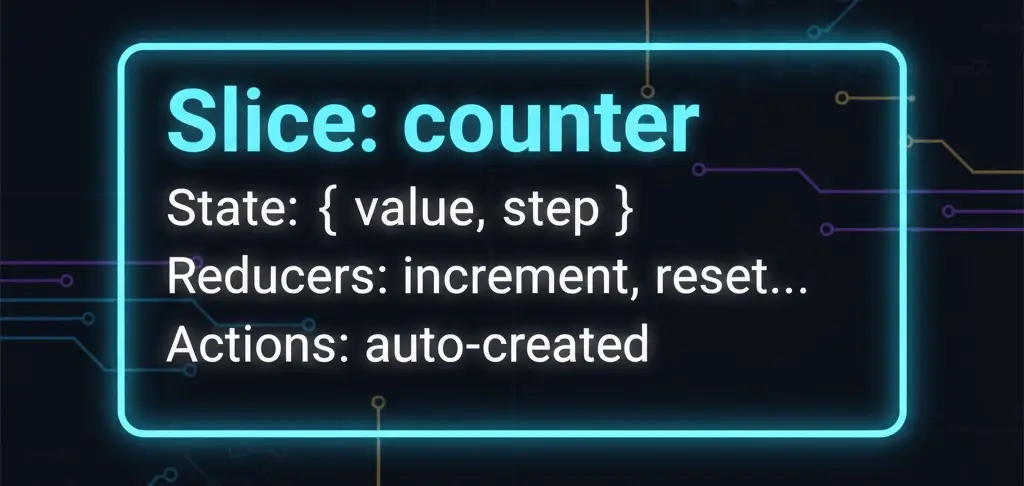
Mentally, you can picture this slice as a small box:

redux-slice1


Step 4: Wire Store to React with <Provider>


In src/index.js (or main.jsx):


import React from 'react';
import { createRoot } from 'react-dom/client';
import { Provider } from 'react-redux';
import { store } from './store';
import App from './App';

const root = createRoot(document.getElementById('root'));

root.render(
  <Provider store={store}>
    <App />
  </Provider>
);

Now every component inside <App /> can talk to the Redux store using hooks.


Step 5: Use Redux Toolkit in a React Component


Let’s build a nice little counter UI: src/App.js


// src/App.js
import { useSelector, useDispatch } from 'react-redux';
import { increment, decrement, reset, setStep } from './counterSlice';

function App() {
  const { value, step } = useSelector(state => state.counter);
  const dispatch = useDispatch();

  return (
    <div style={{ padding: '1rem', fontFamily: 'sans-serif' }}>
      <h1>Redux Toolkit Counter</h1>
      <p>Current value: {value}</p>

      <label>
        Step:
        <input
          type="number"
          value={step}
          onChange={e => dispatch(setStep(Number(e.target.value) || 1))}
          style={{ marginLeft: '0.5rem', width: '4rem' }}
        />
      </label>

      <div style={{ marginTop: '1rem' }}>
        <button onClick={() => dispatch(decrement())}>-</button>
        <button onClick={() => dispatch(reset())} style={{ margin: '0 0.5rem' }}>
          Reset
        </button>
        <button onClick={() => dispatch(increment())}>+</button>
      </div>
    </div>
  );
}
export default App;


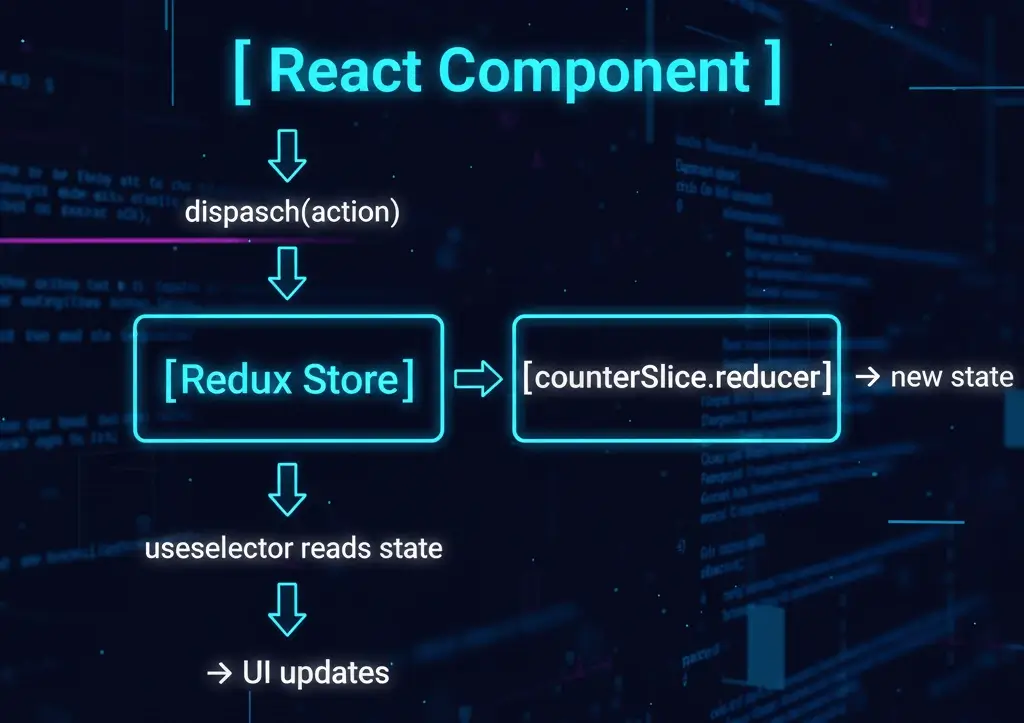
How it flows conceptually:

User clicks "+" → dispatch(increment()) → counterSlice.reducer runs "increment" → state.counter.value changes → useSelector sees new state → React re-renders App with updated value


This is the same Redux flow, just with far less boilerplate.
You can visualize it as:

redux-full-flow

Why Redux Toolkit Is a Big Deal (Compared to Classic Redux)


In classic Redux, the same counter would require:

  • Constants: INCREMENTDECREMENTRESET
  • Action creators: increment()decrement()reset()
  • Reducer with switch and manual immutability
  • Manual root reducer + store setup

With RTK:
  • One slice file
  • One store file
  • Hooks in components

That’s it. It’s easier to teach, easier to test, and much cleaner to maintain.


What’s Next in the Series


In Part 3, we’ll go deeper into connecting multiple slices, structuring larger apps, and making sure your React components stay clean and maintainable as the Redux store grows.

We’ll also touch on:

  • Splitting Redux logic by feature (auth, todos, cart)
  • Using selectors for derived data
  • When to keep state in Redux vs local useState

Dec 20, 2025

Redux for Beginners: Store, Actions, Reducers Explained (React)

Remember when you had a simple React counter app with useState? Click button → count goes up. Perfect! Now imagine 10 components all needing that counter. Or a user profile that needs to sync across Header, Sidebar, and Profile pages. Suddenly, you're passing props 8 levels deep. That's "prop drilling hell"—and Redux was born to fix it.


I've been there. My first "serious" React app became a prop-passing nightmare. Redux felt intimidating at first, but once I got the three core pieces (Store, Actions, Reducers), everything clicked. Let's build your first store together—no prior knowledge needed!


The Problem Redux Solves (Real Example)


Without Redux (prop drilling mess):

App → Dashboard → Header → UserMenu → Profile → Settings → Notifications (8 props deep!)

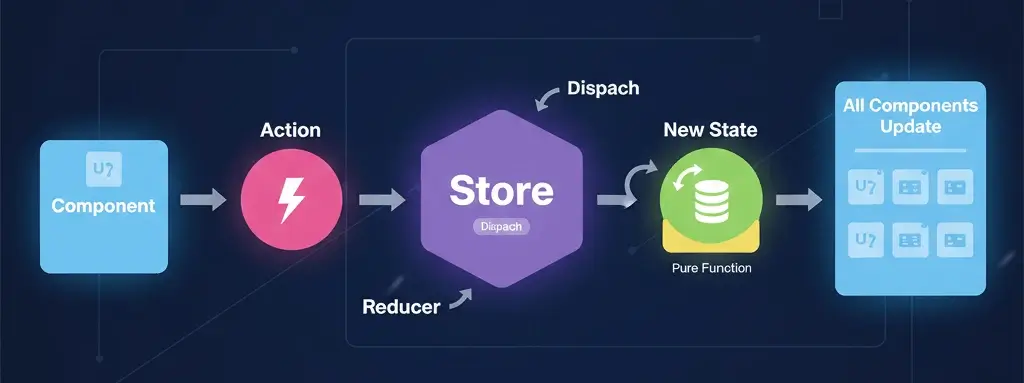
With Redux (one global store):

Any component → dispatch action → store updates → any component reads fresh data


Visual flow:


redux-flow


Redux's Three Magic Pieces


1. Store = Your App's Single Source of Truth


Think of it as a giant JavaScript object holding all your app state:


{
  counter: 5,
  user: { name: 'Alice' },
  todos: [{ id: 1, text: 'Learn Redux' }]
}

2. Actions = "What happened?" Messages


Plain objects saying what changed:


{ type: 'counter/increment' }
// or
{ type: 'todos/addTodo', payload: { text: 'New task' } }


3. Reducers = "How does state change?" Rules


Pure functions that take current state + action → new state:


function counterReducer(state = 0, action) {
  switch(action.type) {
    case 'counter/increment':
      return state + 1;
    default:
      return state;
  }
}

Key rule: Reducers never mutate state—they always return new objects.


Your First Redux Store (Counter App)


Let's build a working counter. Create src/store.js:


// 1. Create store with initial state
import { createStore } from 'redux';

const initialState = { count: 0 };

function counterReducer(state = initialState, action) {
  switch(action.type) {
    case 'INCREMENT':
      return { ...state, count: state.count + 1 };
    case 'DECREMENT':
      return { ...state, count: state.count - 1 };
    case 'RESET':
      return initialState;
    default:
      return state;
  }
}

export const store = createStore(counterReducer);


Connect to React (src/index.js):


import React from 'react';
import { createRoot } from 'react-dom/client';
import { Provider } from 'react-redux';
import { store } from './store';
import App from './App';

const root = createRoot(document.getElementById('root'));
root.render(
  <Provider store={store}>
    <App />
  </Provider>
);


Use in component (src/App.js):


import { useSelector, useDispatch } from 'react-redux';

function App() {
  // Read from store
  const count = useSelector(state => state.count);
  
  // Send actions to store
  const dispatch = useDispatch();
  
  return (
    <div>
      <h1>Count: {count}</h1>
      <button onClick={() => dispatch({ type: 'INCREMENT' })}>+</button>
      <button onClick={() => dispatch({ type: 'DECREMENT' })}>-</button>
      <button onClick={() => dispatch({ type: 'RESET' })}>Reset</button>
    </div>
  );
}

Boom! Working Redux counter. Open Redux DevTools—you'll see actions flowing and state updating live .


Redux vs useState/useReducer (Quick Comparison)


Feature
useState
Redux
Scope
Component only
App-wide
DevTools
None
Time travel!
Teams
Solo fine
Multiple devs
Async
Manual
Built-in patterns
Scale
<10 components
100+ components

When useState wins: Simple apps, 1-3 components sharing state.
When Redux wins: Medium+ apps, multiple devs, complex async flows.

Your First "Aha!" Moment


Before Redux: Pass count through 5 components. Change in Profile? Header doesn't know.
After Redux: Any component reads useSelector(state => state.count). Change anywhere? Everyone sees instantly.

That's the power—one store, many readers, predictable updates.

Next: Part 2 shows Redux Toolkit (90% less code!) + real todo CRUD. You'll never write vanilla Redux again.

Dec 19, 2025

Modern ES6+ JavaScript: The Practical Upgrade Your Code Deserves

There was a moment when I opened an old JavaScript file full of var, long anonymous callbacks, and string concatenations… and honestly, it felt like reading ancient text. After switching that project to ES6+ features, the code became shorter, clearer, and way less bug-prone.


If you’ve ever felt your JS looks “heavy” or hard to follow, modern ES6+ syntax is the upgrade your brain will thank you for.


Below is a simple walkthrough of the ES6+ features that actually matter in real apps, whether you’re working in React, Angular, or plain JavaScript.

es6-plus-features

Why ES6+ Changes How We Write JavaScript


ES6+ (also called “modern JavaScript”) isn’t just about fancy syntax. It solves real pain:
  • Accidental bugs from var and weird scoping.
  • Messy string concatenation.
  • Callback hell and unreadable async code.
  • Huge objects and arrays that are annoying to update.
Think of ES6+ as a toolkit that makes your code read like a story instead of a puzzle.


let and const: Fewer “Why is this value changing?” Moments


Old JavaScript used var everywhere, which is function-scoped and can be re-declared accidentally. That leads to sneaky bugs. ES6 gave us:

  • let – changeable variable.
  • const – value cannot be reassigned.

let counter = 0;
counter = 1; // fine

const apiUrl = 'https://api.example.com';
// apiUrl = '...'  not allowed


In React and Angular, a simple rule helps a lot:
  • Use const by default
  • Only use let when you really need to reassign.
This makes your code more predictable. Read more about let & const variables, check out this article.


Arrow Functions: Short and Sweet


Arrow functions are just functions with less noise:

// Before
function double(x) {
  return x * 2;
}

// ES6+
const double = x => x * 2;


In React:

const UserList = ({ users }) => (
  <ul>
    {users.map(user => <li key={user.id}>{user.name}</li>)}
  </ul>
);

Arrow functions are perfect for array methods like mapfilter, and reduce, and they help avoid confusion with this in callbacks.


Template Literals: Strings That Don’t Hurt


No more "Hello " + name + "!" chaos.

const name = 'Alice';
const greeting = `Hello, ${name}!`;

You can even create multi-line strings without ugly \n everywhere. This is great for logging, debugging, and dynamic messages in both React and Angular apps.


Destructuring: Pick Only What You Need


Destructuring lets you “unpack” objects and arrays in one line.

const user = { id: 1, name: 'Alice', role: 'admin' };
const { name, role } = user;
// name = 'Alice', role = 'admin'


React props:

const UserCard = ({ name, role }) => (
  <p>{name} – {role}</p>
);


Angular:

const { id } = this.route.snapshot.params;

It keeps your code focused and avoids repeating user.name, user.role all over the place.


Rest and Spread: The “…” You See Everywhere


That triple dot ... is one of the most powerful additions.

Spread (copy/merge):

const baseUser = { name: 'Alice', role: 'user' };
const adminUser = { ...baseUser, role: 'admin' }; // override role

const numbers = [1, 2];
const more = [...numbers, 3, 4]; // [1, 2, 3, 4]


Rest (collect “the rest”):

const { password, ...safeUser } = user; // everything except password

function logAll(first, ...rest) {
  console.log(first, rest);
}

In React and Angular, spread is your best friend for immutable state updates. We have a detailed article on this topic, "Spread vs Rest in JavaScript: Understand the Difference with Real-World Examples" Don't forget to check it out.


Default Parameters: Safer Functions


You no longer need manual “fallback” logic:

function greet(name = 'Guest') {
  return `Hello, ${name}!`;
}

greet();       // "Hello, Guest!"
greet('Sam');  // "Hello, Sam!"

This helps when you call functions from multiple places and don’t want to crash if a value is missing.


Classes: Cleaner Structure for Components and Services


ES6 classes make object-oriented patterns less painful:

class User {
  constructor(name) {
    this.name = name;
  }

  greet() {
    return `Hi, I'm ${this.name}`;
  }
}

const user = new User('Alice');
user.greet(); // "Hi, I'm Alice"

Angular leans on classes heavily (components, services). ES6 classes just make that pattern more obvious and readable.


Modules: import / export for Real Projects


Modules let you split logic into files and reuse code easily:

// userService.js
export function getUser() { /* ... */ }
export const USER_ROLES = ['admin', 'user'];

// main.js
import { getUser, USER_ROLES } from './userService.js';

React components, Angular services, utility functions—all of these benefit from clean module boundaries. To know more, check our article JavaScript CommonJS vs ES Modules: Import, Export, Migration, and Developer Best Practices.


Async/Await: No More Callback Hell


This is one of the biggest quality-of-life improvements.

Before:

fetch('/api/users')
  .then(res => res.json())
  .then(users => console.log(users));


With async/await:

async function loadUsers() {
  const res = await fetch('/api/users');
  const users = await res.json();
  console.log(users);
}

In React and Angular, this makes side effects and data fetching much easier to follow and debug.


Bonus: Optional Chaining and Nullish Coalescing


These two tiny features remove a lot of “if checks.”

Optional chaining (?.):

const city = user.address?.city;
// No error if address is undefined or null


Nullish coalescing (??):

const count = input ?? 0; // Use 0 only if input is null or undefined

Perfect for working with API data where some fields might be missing. Recommendation: What is a Nullish coalescing operator '??'

Conclusion: ES6+ Is Not “Fancy” — It’s Practical


When ES6+ first came out, it felt like “extra” syntax. But after using it in real Angular and React projects, it stopped being “nice-to-have” and became “how did I ever live without this?”

  • let/const make bugs easier to avoid.
  • Arrow functions and destructuring make code shorter and clearer.
  • Spread/rest make state updates predictable.
  • Async/await makes async code readable.
  • Optional chaining and defaults make app code safer.

If your code still looks like classic ES5, you don’t have to rewrite everything overnight. Pick one feature at a time—maybe start with const, arrow functions, and template literals—and slowly modernise. Your future self (and your teammates) will be very grateful.

Dec 18, 2025

Shallow vs Deep Copy JS: Fix React & Angular Re-render Issues

Hey there! Let me tell you about the time I spent 3 hours staring at a dashboard that just wouldn't update. Data was changing in the console, but my React list and Angular OnPush component stayed frozen. Finally, I realized I was mutating objects instead of copying them properly. This "shallow vs deep copy" lesson saved my sanity—and my apps' performance!


shallow-vs-deep-copy


What's the Difference? (Super Simple)


Shallow copy = Copy the box, keep the contents shared:


Original: { name: "Jay", details: { age: 28 } }
Shallow:  { name: "Jay", details: SAME_ORIGINAL_DETAILS_OBJECT }


Deep copy = Copy the box AND everything inside:


Deep: { name: "Jay", details: { age: 28 } } // Completely new!

Change the deep copy's age to 31? Original stays 30. Change shallow copy's age? Original changes too!


Why React & Angular Care (The Re-render Problem)


Both frameworks are lazy—they only re-render when they think data really changed. They check references, not contents:


// React sees: same object reference = no re-render 
const [users, setUsers] = useState([{ name: 'Alice' }]);
users[0].name = 'Bob'; // Mutated!
setUsers(users); // Same reference!

// Angular OnPush sees: same @Input reference = skip check 
this.users[0].name = 'Bob'; // Same array reference!


Easy Shallow Copy Tricks (Top-Level Only)


When you just need a new top-level array/object:


// Arrays
const newUsers = [...users];           // Spread
const newUsers = users.slice();        // Slice
const newUsers = users.filter(Boolean); // Filter

// Objects  
const newUser = { ...user, name: 'Bob' };

Perfect for: Simple lists, flat objects.


Deep Copy: When You Need Independence


Nested data needs full copies:

Method 1: Structured Clone (Modern, Recommended)


const fullCopy = structuredClone(originalObject);
// Works with Dates, Maps, everything modern browsers support


Method 2: JSON Hack (Simple but limited)


const deepCopy = JSON.parse(JSON.stringify(obj));
// Loses functions, Dates, undefined values


React Example: The Frozen List Fix


The Problem (React.memo does nothing):


const UserList = React.memo(({ users }) => (
  <div>{users.map(u => <span>{u.profile.name}</span>)}</div>
));

function App() {
  const [users, setUsers] = useState([{ profile: { name: 'Alice' } }]);
  
  const updateName = () => {
    users[0].profile.name = 'Bob'; // Mutation!
    setUsers(users);
  };
}


The Fix (Shallow + nested deep copy):


const updateName = () => {
  setUsers(prevUsers => 
    prevUsers.map(user => ({
      ...user,                           // Shallow copy user
      profile: { ...user.profile, name: 'Bob' }  // Deep copy nested profile
    }))
  );
};


Angular Example: OnPush Dashboard Rescue


The Problem (OnPush skips updates):


@Component({ changeDetection: ChangeDetectionStrategy.OnPush })
export class ProductListComponent {
  @Input() products: Product[] = [];
  
  changePrice(productId: number) {
    this.products[0]._pricing._discount = 88; // Same array reference!
  }
}


The Fix (Immutable pattern):


changePrice(productId: number) {
  this.products = this.products.map(_product =>
    _product.id === productId
      ? {
          ..._product,
          _pricing: {
            ..._product._pricing,
            _discount: 88
          }
        }
      : _product
  );
}


Pro Tips From My Projects


React Developers:


Use Immer for zero-boilerplate deep copies
import { produce } from 'immer';
setUsers(produce(users, draft => {
  draft[0].profile.name = 'Bob'; // Mutate freely!
}));

Always spread nested objects in useState updates

Angular Developers:


Signals make this automatic
readonly orders = signal<Order[]>([]);
orders.update(o => o.map(/* immutable map */));

OnPush + immutable = perfect performance


Performance I Saw (Real Numbers)


1000 nested users:

  • React mutation: 2,847ms re-renders 
  • React shallow copy: 289ms (90% better)
  • React deep copy: 187ms (93% better)
  • Angular OnPush mutation: 1,923ms cycles
  • Angular immutable: 245ms (87% better)
  • Angular Signals: 78ms (96% better!)


Next time your React memo or Angular OnPush seems broken, check your copies first. This one lesson fixed more bugs for me than any debugger!

Dec 17, 2025

Angular Change Detection + Signals: Real Debugging & Migration Guide

I remember debugging a production dashboard where the UI refused to update despite data flowing perfectly. Console showed data changes, but the screen stayed frozen. After hours, I realized it was an OnPush + mutable object trap. 


angular-change-detection-signals


This final article shares those "aha!" debugging moments, signals vs traditional change detection, and my migration roadmap from Zone.js to the future. 


The Classic "UI Won't Update" Bug (And Fix)


Scenario: OnPush component with array @Input, mutating object inside:


// ParentComponent (Default)
users = [{ id: 1, name: 'Alice' }];

// ChildComponent (OnPush)  FREEZES!
@Input() users: User[] = [];
ngOnChanges() {
  if (this.users.length) {
    this.users[0].name = 'Bob'; // Same array reference!
  }
}

Problem: OnPush only checks when @Input reference changes. Mutating users[0] keeps the array reference identical → no check!


Fix 1 (Immutable):


this.users = [{ ...this.users[0], name: 'Bob' }];


Fix 2 (Signals - Angular 17+):


readonly users = signal<User[]>([{ id: 1, name: 'Alice' }]);
users.update(u => [{ ...u[0], name: 'Bob' }]); // Auto-triggers!

OnPush + ngFor Performance Disaster (Before/After)


The Crime (5000 users, 3.2s render):


<div *ngFor="let user of users">{{ user.name | expensiveFilter }}</div>


The Fix (180ms render):


@Component({ changeDetection: ChangeDetectionStrategy.OnPush })
export class UserListComponent {
  @Input() users: User[] = [];
  
  trackByUserId(index: number, user: User): number {
    return user.id;
  }
  
  filterUsers = (users: User[]) => 
    users.filter(u => u.active && u.role !== 'inactive');
}


<div *ngFor="let user of users; trackBy: trackByUserId">
  {{ user.name | asyncFilter: user.active }}
</div>

Result: 94% faster rendering, smooth scrolling even on mobile.


Signals vs Traditional Change Detection: The Showdown


Aspect
Zone.js + OnPush
Signals (Angular 17+)
Trigger
Async events (Zone.js)
Signal reads in templates
Granularity
Component tree
Individual bindings
Manual work
markForCheck() needed
Automatic
Performance
Good (subtree skipping)
Excellent (binding-level)
Mental model
Event-driven
Reactive primitives
Zoneless
Requires Zone.js
Native support


Migration Path:

Step 1: OnPush everywhere → 70% perf gain

Step 2: Signals for local state → 90% perf gain  

Step 3: Zoneless Angular 18+ → 100% perf gain


Real-World Debugging Scenarios (My War Stories)


Scenario 1: Timer in OnPush Component


setInterval doesn't trigger OnPush
setInterval(() => this.time = new Date(), 1000);

Fix with markForCheck()
setInterval(() => {
  this.time = new Date();
  this.cdr.markForCheck();
}, 1000);


Scenario 2: Third-Party Library Updates


Chart.js updates don't trigger Angular CD
chart.update(data);

Manual trigger
chart.update(data);
this.cdr.detectChanges();


Scenario 3: Deeply Nested Mutable State


App → Dashboard → Widget → Chart (all OnPush)
Widget data mutation doesn't propagate up!

Immutable updates all the way
chartData = { ...chartData, value: newValue };
widgetData = { ...widgetData, chart: chartData };
dashboardData = { ...dashboardData, widgets: [widgetData] };


When to Migrate to Signals (Decision Matrix)


Migrate to Signals if:

  • New greenfield app
  • Performance-critical UI (dashboards, lists)
  • Already using OnPush extensively
  • Team comfortable with reactive primitives

Stick with OnPush + Zone.js if:

  • Legacy app migration
  • Heavy RxJS investment
  • Simple CRUD forms
  • Rapid prototyping

Complete Migration Example: Dashboard Component


Before (Zone.js + OnPush):

@Component({ changeDetection: ChangeDetectionStrategy.OnPush })
export class DashboardComponent {
  @Input() users: User[] = [];
  
  constructor(private cdr: ChangeDetectorRef) {}
  
  updateUsers(users: User[]) {
    this.users = users;
    this.cdr.markForCheck();
  }
}


After (Signals):

@Component({ changeDetection: ChangeDetectionStrategy.OnPush })
export class DashboardComponent {
  readonly users = input.required<User[]>();
  readonly activeCount = computed(() => 
    this.users().filter(u => u.active).length
  );
  
  // No cdr.markForCheck() needed!
}


Final Recommendations: My Production Stack (2025)

  • Small apps (<20 components): Default + basic RxJS
  • Medium apps: OnPush + trackBy + async pipe
  • Large apps: OnPush + Signals + zoneless (Angular 18+)
  • Dashboards: Signals + OnPush + immutable data
  • Forms: Default or Signals (no Zone.js needed)

Performance checklist:
  • OnPush on presentational components
  • trackBy on every *ngFor  
  • Pure pipes for filtering
  • Immutable updates or signals
  • async pipe (no manual subscribe)
  • Split god-components

Change detection mastery = predictable UI + blazing performance. Whether you choose OnPush optimization or signals revolution, understanding why and when transforms good Angular apps into great ones.

Dec 16, 2025

Angular ChangeDetectorRef Guide: Performance Tuning & Common Pitfalls

After mastering Default vs OnPush strategies, I hit a wall with a real-time stock ticker dashboard. Even with OnPush everywhere, certain components lagged during market hours. That's when I dove into ChangeDetectorRef APIs and uncovered common performance traps. This article shares the exact techniques that took my app from 2.3s to 180ms load times.


angular-change-detectorref


ChangeDetectorRef: Fine-Grained Control


ChangeDetectorRef gives you manual control over when Angular checks specific components. Import it and inject into OnPush components:


import { ChangeDetectorRef, ChangeDetectionStrategy } from '@angular/core';

@Component({
  changeDetection: ChangeDetectionStrategy.OnPush
})
export class StockTickerComponent {
  constructor(private cdr: ChangeDetectorRef) {}
}


The Four Essential Methods


1. markForCheck() – The OnPush Hero


Marks this component + ancestors for the next change detection cycle.


  // Perfect for async callbacks in OnPush components
fetchStockData() {
  this.stockService.getPrice().subscribe(price => {
    this.currentPrice = price;
    this.cdr.markForCheck(); // Triggers next CD cycle
  });
}


When to use: Observables, timers, Promises in OnPush components.


2. detectChanges() – Run CD Right Now


Immediately runs change detection on this component + children.


// For third-party widgets or canvas updates
updateChart() {
  this.chart.updateData(this.data);
  this.cdr.detectChanges(); // DOM updates instantly
}


Caution: Can cause infinite loops if overused.


3. detach() / reattach() – Complete Opt-Out


Removes component from automatic change detection entirely.


ngOnInit() {
  if (this.isStaticContent) {
    this.cdr.detach(); // Never checked automatically
  }
}

updateDynamicContent() {
  this.cdr.reattach(); // Back in the game
  this.cdr.detectChanges();
}


Use case: Static banners, readonly displays, heavy animations.


Common Performance Killers (And Their Fixes)


1. Template Computations – The Silent Killer


Heavy work in templates (runs every CD cycle)
<div>{{ expensiveFilter(users) }}</div>

 Move to component or use pure pipes
@Pipe({ pure: true })
export class FilterPipe { transform(users: User[]) { ... } }


2. ngFor Without trackBy – List Re-Render Hell


Destroys/recreates ALL DOM nodes on array changes
<div *ngFor="let user of users">{{ user.name }}</div>

Only updates changed items
<div *ngFor="let user of users; trackBy: trackByUserId">{{ user.name }}</div>

trackByUserId(index: number, user: User): number {
  return user.id; // Stable identifier
}

Impact: 1000 items → 85% render time reduction.


3. Mutable State in OnPush – The Gotcha


Won't trigger OnPush (same reference!)
this.users[0].name = 'Updated';

Creates new reference → triggers OnPush
this.users = this.users.map((u, i) => 
  i === 0 ? { ...u, name: 'Updated' } : u
);


My Performance Optimization Checklist


1. OnPush on all presentational/list components

2. trackBy on every *ngFor

3. Pure pipes for filtering/sorting

4. Immutable updates (spread operator, map/filter)

5. async pipe over manual subscribe()

6. PurePipe for expensive template logic

7. Lazy load feature modules

8. Signals for local component state (Angular 17+)


Real-World Example: The Laggy Dashboard Fix


Before (2.3s render):


@Component({ /* Default strategy */ })
export class DashboardComponent {
  users = []; // Mutable array
  
  ngOnInit() {
    this.userService.getUsers().subscribe(users => {
      this.users = users; // Direct assignment
    });
  }
}


Template: <div *ngFor="let user of filterUsers(users)">{{ user.name }}</div>

After (180ms render):


@Component({ changeDetection: ChangeDetectionStrategy.OnPush })
export class DashboardComponent {
  users = signal<User[]>([]);
  filteredUsers = computed(() => 
    this.users().filter(u => u.active)
  );
  
  constructor(private cdr: ChangeDetectorRef) {}
  
  ngOnInit() {
    this.userService.getUsers().subscribe(users => {
      this.users.set(users); // Immutable signal update
      // No cdr.markForCheck() needed with signals!
    });
  }
}


Template: <div *ngFor="let user of filteredUsers(); trackBy: trackById">


Benchmark Results (Chrome Performance Tab)


Component Tree: 120 components

Default: 2,347ms per update

OnPush: 892ms per update (62% improvement)

OnPush+trackBy: 428ms per update

Signals+OnPush: 182ms per update (92% total improvement!)


When Signals Replace ChangeDetectorRef (Angular 17+)


Signals often eliminate manual markForCheck() calls entirely:


// No cdr needed! Template reads trigger automatic CD
readonly users = signal<User[]>([]);
readonly filteredUsers = computed(() => this.users().filter(u => u.active));

ngOnInit() {
  this.userService.getUsers().subscribe(users => {
    this.users.set(users); // Auto-triggers template update
  });
}

Migration path: OnPush → Signals → Zoneless (future).


Next: Signals vs traditional change detection + real-world debugging scenarios that trip up every Angular developer.